【VRChat向けバックアップツール】VRC Vault
- ダウンロード商品本体¥ 400
- ダウンロード商品応援する¥ 800
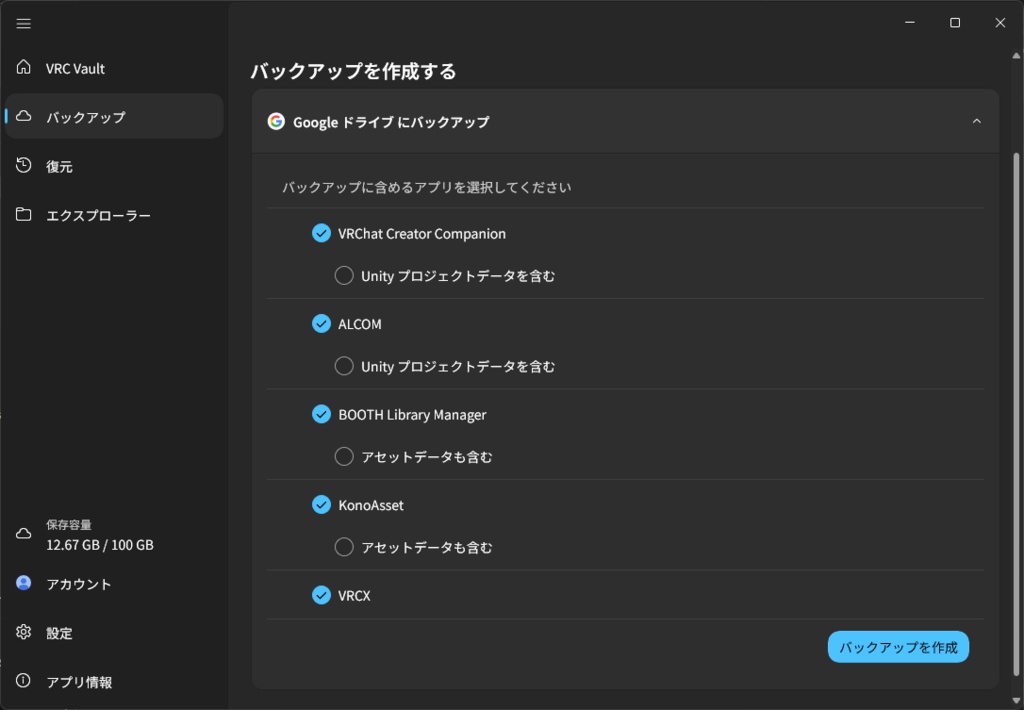
VRC Vault - VRChat環境まるごとバックアップ ■ こんなご経験ありませんか? ・PCを買い替えたら VCC や ALCOM の設定が全部消えた ・OS再インストールでアバター管理ツールのデータが吹き飛んだ ・気づいたら設定ファイルがどこにあるか分からない ・大事なUnityプロジェクトデータのバックアップを取り忘れていた ・バックアップを1つずつぽちぽちしていませんか? VRChat関連環境は、いろんなツールの設定があちこちのフォルダーに散らばっています。 VRC Vault は、それらをワンクリックでまるごとバックアップ・復元できるWindows アプリです。 ■ 対応ツール ・VCC(VRChat Creator Companion) ・ALCOM ・BOOTH Library Manager ・KonoAsset ・VRCX ・VRChat の Unity プロジェクト 各ツールの設定・データベースの「保存場所」をあらかじめ把握しているので、面倒な設定は不要です。 ※明示的にインストール場所を変更されているユーザー様は変更の設定が必要です。 --- VRC Vault - Back Up Your Entire VRChat Environment ■ Does this sound familiar? ・You got a new PC and lost all your VCC and ALCOM settings ・An OS reinstall wiped out your avatar management tool data ・You have no idea where your config files even are anymore ・You forgot to back up your important Unity project data Your VRChat-related setup is scattered across countless folders, one for each tool. VRC Vault is a Windows app that backs up and restores all of it in a single click. ■ Supported Tools ・VCC (VRChat Creator Companion) ・ALCOM ・BOOTH Library Manager ・KonoAsset ・VRCX ・VRChat Unity projects VRC Vault already knows where each tool keeps its settings and databases, so there's no tedious setup required. *If you've manually changed an install location, you'll need to configure that path yourself.
✅使い方
1. ダウンロードした「vrc-vault-x.x.x-setup.exe」をダブルクリックし、インストーラーを起動します。 2. 「WindowsによってPCが保護されました」という青い画面が出た場合は、「詳細情報」→「実行」をクリックします。 3. 画面の指示に従って、インストールします。 4. アプリを起動し、「アカウント」画面からお持ちのGoogleアカウントでログインします。バックアップはあなた自身のGoogleドライブに保存されます。 5. 「バックアップ」画面で対象アプリを選び、バックアップを作成します。Googleドライブへ自動でアップロードされます。 ※バックアップの前に、対象のアプリはすべて終了してください。正しくバックアップされないことがあります。 6. 復元したいときは「復元」画面でバックアップを選び、復元します。 ※復元の前に、対象のアプリはすべて終了してください。正しく復元されないことがあります。 7. アンインストールしたいときは、Windowsの「設定」→「アプリ」から「VRC Vault」を選んで削除してください。
🌐更新履歴
2026年6月11日 vrc-vault-0.0.6 ・初版公開